Hi All,
We have some general suggestions for improving the overall user experience.
Wrk action : Go to URL
Section : Open link in new tab?
Description : Open the link in a new tab and close the old tab. Note this will close the existing tab
Suggestion : If possible, can we separate these two options? Currently, opening the link in a new tab also closes the existing tab. It would be better to have two separate options:
- One option to Open the link in a new tab and do not close the current tab.
- One option to Open the link in a new tab and close the current tab (Existing one).
This would give users more flexibility, especially when they want to keep the existing tab open and work in a new one.
Data Store :
Suggestion : When we create a table in Data Store, we currently have to search and manually click on the table to open it. If possible, could the open table automatically immediately after it is created? This would provide a better user experience.
Debug Console in Launch
In the Debug Console, if any input or output contains a very long text, could we truncate the text for variables with long values when the wrk action is expanded and provide a "Show More / Show Less" option?
The current issue is that when the input or output text is very long, users have to scroll a lot before they can see the other configurations.
Suggestion : By default, the text should remain in the "Show More' (truncated) state to keep the Debug Console clean and easy to navigate.
Suggestion : If the data in the console is in JSON, it should be displayed as properly formatted JSON for better readability.
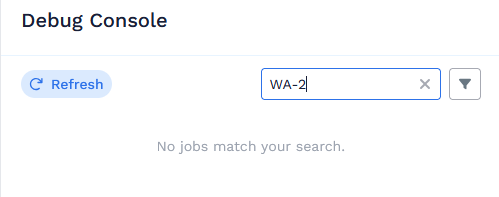
Bug : We can currently search by Wrk action name (For ex. 'Query Table'), but not with the wrk action number (For ex. 'WA-2'). If possible, could we also support searching by the Wrk action number, such as "WA-2"?
The documentations : https://support.wrk.com/docs/getting-started/platform-tour/workflow-automation/debug-console/#the-debug-console-screen also stated that 'Filter Wrk Action executions by Wrk Action name or index (for example, WA-1 or Copy content)' but it does not work with WA number.
Wrk Action Test Functionality
When we use the Test functionality for any wrk action and run the test, the each output parameter is displayed with a Copy button. Currently, when we copy a string value, it copies the entire value including the double quotes (ie. "api.atlassian....").
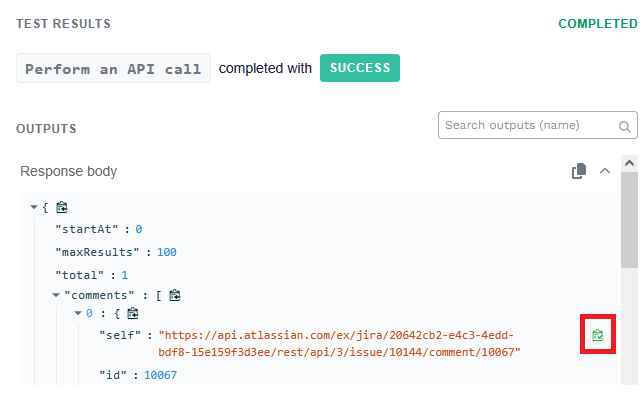
If possible, could we copy only the internal value ( api.atlassian.... ) without the double quotes? So that it can be used as it is.
This issue occurs only with string values, while numeric values are copied correctly. Making this behavior consistent would result in a better UX.
@david @Dean @Jean-FrancoisMartin @Nick @Ashutosh @Sonu
Thank You


